
AI Automation for Small Business: 5 Practical Workflows to Save 10+ Hours/Week (Without Hiring)
- Sam Weinstein
- Apr 3
- 4 min read

Running a small business today is not hard because you lack ideas. It is hard because work arrives faster than your team can move it forward: leads, support requests, invoices, and internal updates all compete for attention.
That is exactly where AI automation for small business creates real value: not by writing more content, but by routing, updating, scheduling, and logging the work that keeps revenue and operations moving.
If you are non-technical, you do not need to become an AI expert. You need a simple, measurable plan: pick one workflow loop, build it with guardrails, and measure results in 2 weeks.

What AI Automation Means (in plain English)
AI automation for small business is using AI plus workflow tools to capture information, decide what should happen next, and take actions like updating your CRM, routing a support ticket, or logging an invoice. The goal is simple: less repetitive admin, more time serving customers.
AI automation vs basic automation
Basic automation follows clean rules like: if a form is submitted, send an email. AI automation handles messy inputs like emails, chats, and PDFs by extracting details, classifying requests, and recommending next steps.
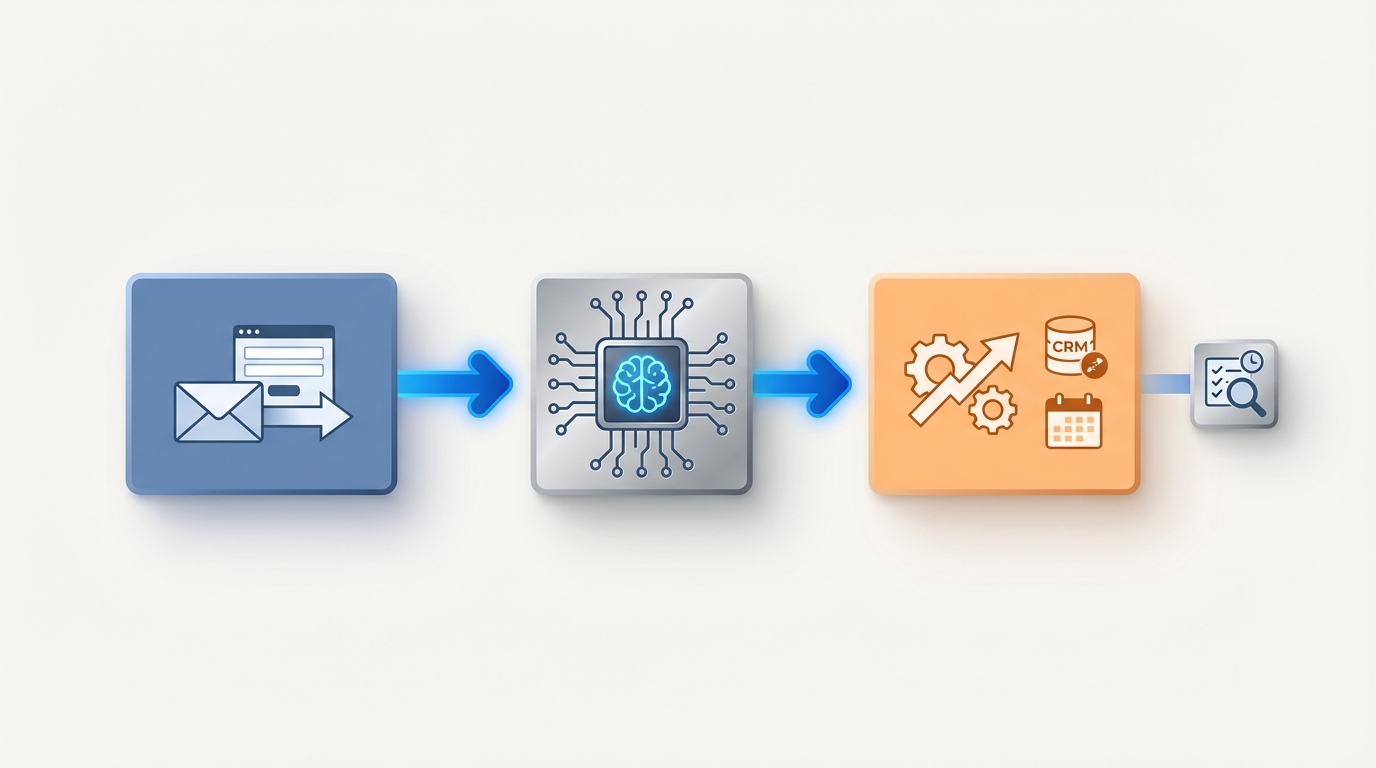
The 3 building blocks: trigger -> decision -> action
Trigger: a form submission, email, ticket, or file upload.
Decision: AI extracts fields and applies routing rules (urgency, category, fit).
Action: your systems move forward (create/update records, notify someone, schedule, file, log).
Before you automate anything: choose your first loop (2-week pilot)
The fastest wins come from focus. Start with one loop that happens frequently and has a clear KPI. Great pilots are frequent, measurable, and reversible.
Quick checklist to pick the right first automation
Frequency: weekly or more.
Measurable KPI: response time, conversion, cycle time, hours saved.
Low downside if wrong: start in assist mode.
System of record: CRM, help desk, or accounting tool.
Clear owner: someone checks logs and handles exceptions weekly.
Timeline (so you can plan it)
Pilot build: 3 to 10 business days for measurable results.
Stabilization: 2 to 4 weeks for edge cases, approvals, monitoring.
Maintenance: 30 to 90 minutes per week once stable.
Workflow #1: Lead-to-meeting automation (speed to revenue)
Many SMBs lose deals because follow-up is slow or inconsistent. This workflow is often the highest ROI because it directly affects revenue.
Example workflow (copy these steps)
A lead comes in via a form, inbound email, or lead ads.
AI extracts key details (service needed, ZIP, urgency, budget range).
Create or update the CRM record and dedupe.
Route to the right owner or rep and propose calendar slots.
Notify Slack or Teams and log the full trail for accountability.
KPIs to track
Time to first response (minutes)
Lead to meeting conversion rate
Guardrails
Strict dedupe rules so you do not create CRM chaos.
Approval for outbound messages until quality is consistent.
Read next: Automate Lead Follow-Up | AI Automation Guardrails
Workflow #2: Support triage + draft replies (cost to serve)
Support automation works best when it classifies, routes, and drafts so humans stay in control for exceptions.
Classify inbound email or chat and detect urgency.
Pull context from your knowledge base, CRM, or order system.
Draft a reply; auto-send low-risk answers, escalate anything risky.
Guardrails
Confidence thresholds: if unsure, escalate.
Policy boundaries: do not promise refunds or legal commitments without review.
Read next: AI Support Triage Workflow
Workflow #3: Invoice and AP intake automation (operations reliability)
Invoice intake is repetitive and time-sensitive. Automating extraction and routing reduces late fees, rework, and owner involvement.
Extract vendor, amount, due date, and job code from PDF invoices.
Detect duplicates and route approvals by threshold.
Create the bill in QuickBooks or Xero and file the PDF consistently.
Read next: Invoice Intake Automation
Workflow #4: Ops reporting agent (no more status meetings)
If meetings feel like reading tools aloud, you have a visibility problem. An ops reporting agent pulls updates from systems and posts a daily or weekly digest.
Pull updates from CRM, tickets, and projects.
Highlight top risks and blockers.
Read next: Ops Digest Agent
Workflow #5: Employee onboarding + access provisioning
Onboarding done ad hoc slows ramp and creates security gaps. Standardize the first week and make offboarding symmetrical.
Collect new-hire details and generate a role-based checklist.
Provision access with least privilege and schedule 30/60/90 check-ins.
Read next: Employee Onboarding Automation
Tools SMBs actually use (and how to choose)
Zapier: fastest to launch with many integrations.
Make.com: better visual control for complex scenarios.
n8n: deeper logic and self-hosting options.
Read next: Zapier MCP for Business
Guardrails that prevent chaos
Permissions and least privilege.
Approvals for risky actions.
Audit logs so you can see what happened and when.
Want this implemented safely? See: AI Automation Services
Start this week (simple plan)
Day 1: pick one loop and define the KPI.
Days 2-3: map fields and build in assist mode (draft, notify, log).
Week 2: add exceptions and monitoring; measure results daily.
FAQ
What is the best AI automation for a small business?
The best automation is tied to a measurable KPI and a frequent workflow. For many SMBs that means lead follow-up, support triage, or invoice intake.
How much does AI automation cost per month?
Costs come from platform fees (tasks, executions, credits) plus light maintenance time. Many SMBs start around $50 to $300 per month for one or two workflows, then scale with volume.
Is Zapier enough, or do I need custom code?
Zapier is enough for many early wins like routing and notifications. You may need custom work for advanced logic, strict governance, or complex multi-system sync.
What should I never fully automate?
Avoid full autopilot for anything that can create legal, financial, or reputational damage: refunds, pricing exceptions, HR decisions, and sensitive customer escalations. Start those in assist mode with approvals.
Your next move
Pick one loop and run a two-week pilot in assist mode with logging and a clear KPI. Once you prove a measurable win, you will know exactly what to scale next.
If you want a faster, safer path, book a 20-minute AI Automation Pilot Planning Call. Or see examples of what is possible: Case Studies
Comments