
AI Automation for Small Business: 5 High‑ROI Workflows (and a 30‑Day Plan to Implement Them)
- Sam Weinstein
- Apr 20
- 7 min read

You didn’t start your company to spend your nights chasing invoices, answering the same customer questions, and copying data between systems.
If you’re like most owner‑operators, the work keeps coming in, but headcount can’t scale at the same speed—so you become the backstop.
That’s why AI automation for small business is finally worth taking seriously: workflow automation that takes a request from intake to completion (or escalation) while you track real ROI—time saved, fewer errors, and faster cash flow.

What AI Automation Means for a Small Business (No Jargon)
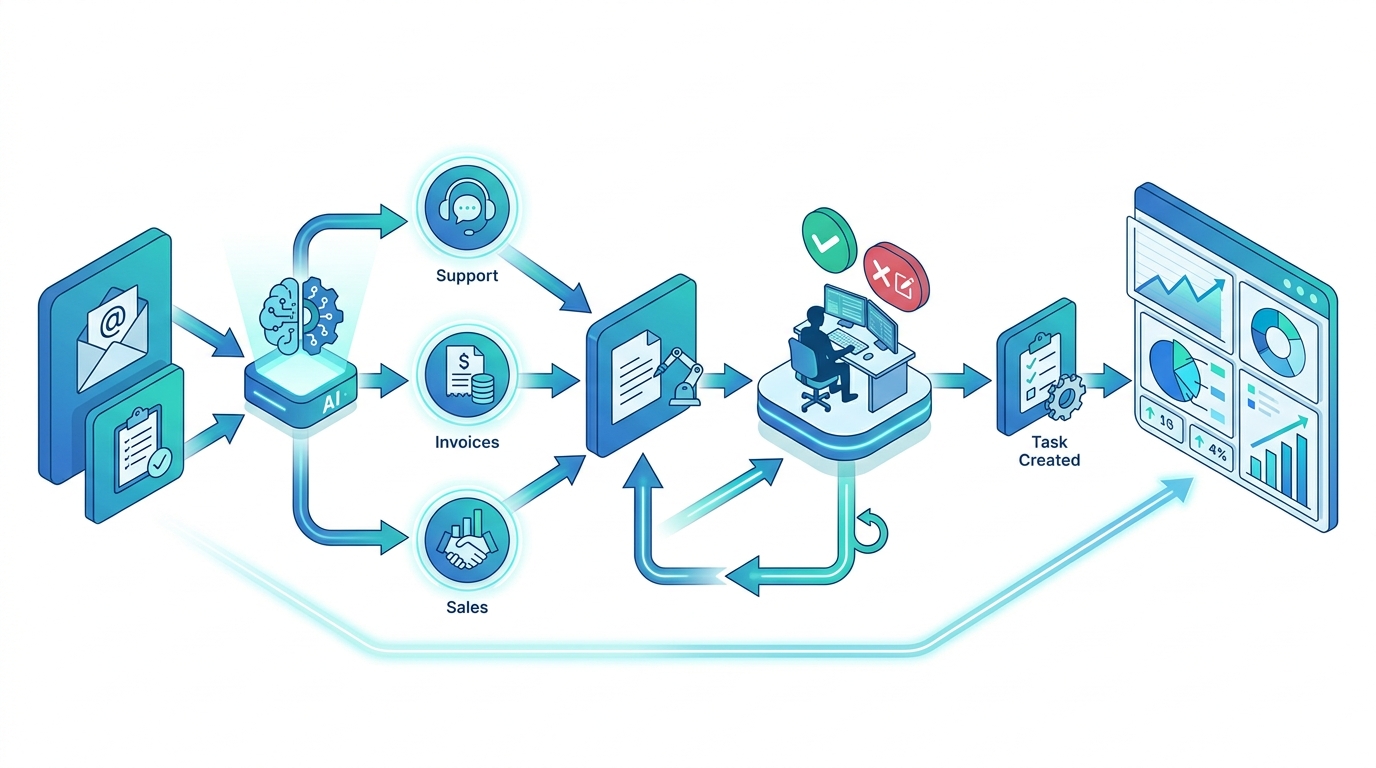
AI automation for small business means using AI‑assisted workflow steps to handle repeatable work—like triaging requests, drafting responses, updating records, and creating next‑step tasks—so your team spends less time on busywork and more time on customer outcomes.
In plain terms: you’re not buying AI. You’re building business process automation that your staff can trust.
Task automation vs. outcome automation
Task automation helps with one step (for example drafting an email or summarizing a call). Outcome automation handles the whole loop (for example resolving Tier‑1 tickets, sending invoice reminders and logging outcomes, or generating proposals from approved templates and updating the CRM).
The #1 mistake: scaling before you can prove ROI
The fastest way to waste money is to roll automation out broadly before you can measure quality. When quality slips, you get silent rework: tickets reopen, customers call back, invoices get disputed, and your team quietly fixes errors.
If you can’t see those costs, you’ll think it’s working—until you feel the damage in churn, refunds, and lost time.
The ROI Scoreboard: How to Prove AI Is Paying You Back
To make AI automation pay back, treat it like any investment: baseline → pilot → measure → scale. The easiest way is an ROI Scoreboard—a small set of numbers you review weekly.
Baseline metrics to capture this week (60–90 minutes)
Pick one workflow (support, invoices, proposals, reporting) and record these baseline metrics for five business days.
Cycle time: request received → done
Touches per outcome: how many handoffs or back‑and‑forth steps
Error rate: reopens, revisions, corrections, disputes
Labor cost per outcome: time × loaded hourly cost (rough estimate is fine)
ROI Scoreboard template (copy/paste)
Tier‑1 customer support — Median resolution time: 18 hrs → target 12 hrs
Tier‑1 customer support — Touches per ticket: 4.2 → target 3.0
Invoice follow‑ups — Days Sales Outstanding (DSO): 52 days → target 45 days
Proposals and quotes — Time to send first draft: 3 days → target 1 day
A simple ROI formula (use this monthly)
Monthly ROI = (hours saved × loaded hourly cost) − (software + AI usage + review time). Example: 400 tickets per month × 3 minutes saved each is about 20 hours per month. At $35 per hour loaded cost, that is about $700 per month in capacity.
Stop rules (so automation never goes net‑negative)
Before you pilot, choose a pause and fix rule:
Support: If reopen rate increases by 10% or more vs. baseline for two weeks, pause and review failures.
Finance: If disputes increase by 10% or more or a customer complains about tone, roll back messaging.
Sales: If a proposal includes unapproved pricing or terms even once, require approvals for that section.
5 High‑ROI AI Automations for Small Businesses (Pick One to Start)
Start with a workflow that has high volume, a clear definition of done, and real business value (margin, cash flow, or customer experience).
Customer service: Tier‑1 triage and faster resolutions
Accounts receivable: invoice follow‑ups and exception handling (reduce DSO)
Sales: proposals, follow‑ups, and CRM updates
Operations intake: route requests into tasks with clean summaries
Marketing loop: generate variants and track experiments
1) Customer service acceleration (Tier‑1 triage + faster resolution)
Best for: eCommerce, home services, B2B SaaS, professional services.
What it automates:
Classifies inbound messages (billing vs. shipping vs. technical)
Pulls answers from approved policies and SOPs
Drafts a response and the next step
Escalates when it is uncertain (instead of guessing)
ROI drivers: fewer touches per ticket, shorter resolution times, fewer escalations. Guardrails: approved knowledge sources and a strict do not guess policy. Time to pilot: 7–14 days for an assist‑mode workflow.
2) Finance ops: invoice follow‑ups + exception handling (reduce DSO)
Best for: agencies, distributors, B2B services, light manufacturing.
What it automates:
Drafts reminder sequences in your brand voice
Classifies replies (needs PO, wrong invoice, needs credit memo, paid already)
Summarizes disputes and creates next‑step tasks for your bookkeeper
ROI drivers: faster cash collection and fewer manual follow‑ups. Guardrails: approved templates, clear payment‑term rules, and one system of record.
3) Sales enablement: proposals, follow‑ups, and CRM updates
Best for: MSPs, B2B services, construction trades, SaaS.
What it automates:
Summarizes discovery calls and drafts follow‑up emails
Creates proposal and SOW drafts from approved templates
Updates the CRM (stage, next step, requirements)
ROI drivers: faster response time and more selling time. Guardrails: approvals for pricing and terms language, and a rule that no commitments go out without review.
4) Operations intake: classify requests → create tasks → notify owners
Best for: any business with recurring intake (internal requests, vendor forms, project requests).
What it automates:
Reads inbound requests (email, forms, chat)
Classifies type and urgency
Creates tasks in your project tool
Routes to the right owner with a clean summary
ROI drivers: fewer dropped balls, faster handoffs, less time clarifying basics. Guardrails: clear categories, required fields, and escalation when information is missing.
5) Marketing conversion loop: generate variants + track experiments
Best for: SMBs running consistent paid ads, email campaigns, or landing page tests.
What it automates:
Generates ad, landing, and email variants inside brand rules
Summarizes weekly performance
Suggests the next test based on results
ROI drivers: more experiments per month and faster iteration. Guardrails: a measurement plan that avoids vanity metrics and a test cadence your team can execute.
A Practical 30‑Day Implementation Plan (Owner‑Friendly)
Most SMB automation projects fail because they try to automate five departments at once. A better path is a 30‑day sprint: one workflow, end‑to‑end, measured, with safety controls.
The 4‑step 30‑day sprint (quick overview)
Week 1: choose one outcome and baseline it
Week 2: build assist mode with approvals
Week 3: add quality checks and failure tracking
Week 4: run a controlled pilot and publish the ROI dashboard
Week 1 — Choose one outcome + baseline it
Choose a workflow that happens often enough to measure quickly. Agree on what counts as done, what counts as an error, and what must be escalated.
Week 2 — Build with human‑in‑the‑loop approvals
Start with assist mode, not autopilot. The AI drafts, a human approves, and the system logs outcomes.
Week 3 — Add quality checks and failure tracking
If you can’t see where the workflow fails, you can’t fix it. Add simple evaluation checks and track exceptions so you can improve the workflow safely.
Week 4 — Launch a controlled pilot + publish the dashboard
Run the workflow on a defined slice (for example Tier‑1 tickets only, or invoices 15+ days past due). Review the scoreboard weekly and expand only when quality stays stable.
Risk & Governance: Automate Without Brand or Compliance Headaches
Automation only works long‑term when your team trusts it. Trust comes from guardrails—not from hoping the AI behaves.
Data access rules
Define these in writing:
Allowed sources (helpdesk, CRM, policy docs, past tickets)
Prohibited data (SSNs, full card numbers, medical info, anything you do not need)
What gets logged for auditing
Escalation thresholds
Make escalation easy and expected. Common triggers include:
The workflow cannot find a policy answer
The customer is upset or threatening to cancel
Money is involved (refunds, credits, contract terms)
The message includes legal language
Change control
Even small prompt or template changes can change outcomes. Protect yourself with:
Versioning for prompts and templates
Approvals for high‑risk changes (billing language, refunds, pricing)
Weekly review of failures and stop rules
Action Steps You Can Take This Week
Pick one workflow to improve and write a one‑sentence definition of done.
Track baseline metrics for five business days: cycle time, touches per outcome, error rate, and rough labor cost.
Identify guardrails: what must be approved, what can be automated, and when to escalate.
Build the first version in assist mode and log every exception.
Set a stop rule: if error rate rises by 10% vs. baseline, pause and review before expanding.
FAQ
What’s the best AI automation to start with?
Start with the workflow that has the clearest ROI and the most repeatable steps. For many SMBs, that is Tier‑1 customer support (high volume) or invoice follow‑ups (direct cash‑flow impact).
How much does AI automation cost for a small business?
Most costs fall into three buckets: tool subscriptions, usage‑based AI costs, and human review time during the pilot. Many owners can run a pilot for a few hundred dollars per month (plus internal time) and scale spend only after the scoreboard stays positive.
Do I need to hire an engineer to automate workflows with AI?
Not always. If you are connecting common tools and your steps are clear, you can often pilot without hiring. If you need stronger integrations, privacy controls, or complex routing rules, expert help can be cheaper than trial and error.
How do I measure AI automation ROI?
Measure outcomes, not activity. Track cycle time, touches per outcome, error rate, and labor cost per outcome, then compare baseline vs. pilot over the same window.
Next Steps
If you’re serious about AI automation for small business, start by choosing one automated outcome and building your ROI Scoreboard. Once you can prove a workflow saves time without increasing errors, scaling becomes a business decision—not a leap of faith.
If you want help scoping the right first workflow, guardrails, and measurement plan, book a short call:

Comments