
AI Automation for Small Business: A Practical 30-Day Plan to Prove ROI (Without Hiring a Data Team)
- Wix Services

- Mar 30
- 6 min read
The real challenge most owners face
You didn’t start your company to spend your best hours rewriting proposals, digging through email threads, chasing invoices, or answering the same customer questions on repeat.
In a typical 5–50 person team, those “small” tasks quietly stack up. They create routine, writing-heavy, decision-light work that steals capacity from sales, service, and leadership.
That’s why AI automation for small business is suddenly a practical conversation—not a shiny-object one. Done right, it helps your team move faster without lowering quality.
What “AI automation” means for a small business (plain English)
AI automation for small business isn’t about replacing people. It’s about building AI-assisted workflows where AI handles first drafts, summarizing, sorting, and “blank page” work—then your team reviews, edits, and sends.
Definition (simple): AI automation for small business means using AI to speed up repeatable tasks (writing, triage, summaries, checklists) while humans keep final control. You standardize templates, add review steps, and track ROI like any other process improvement.
AI vs. automation vs. AI-assisted workflows
Automation: “If X happens, do Y” (rules-based business process automation)
AI: generates or summarizes text, extracts action items, drafts replies, categorizes requests
AI-assisted workflow: AI produces a strong starting point, and your team validates before anything goes out
Where AI pays off fastest in SMBs
Small business AI automation works best when the work is repeatable, high-friction, and measurable.
Repeatable (same pattern every day)
High-friction (slower than it should be)
Measurable (you can track cycle time, response time, rework, or escalations)
The biggest mistake SMBs make: buying tools before picking workflows
Many owners run into seat sprawl: licenses grow while outcomes stay flat, because nobody agreed on which work should improve and how to measure it.
The fastest path to ROI is simple: start with two workflows, prove results in 30–45 days, then scale.
The 3 criteria for a high-ROI workflow
Frequency: happens daily or weekly (not quarterly)
Friction: slow, annoying, or forces too many back-and-forth loops
Measurable: you can baseline it and check it weekly without a dashboard project
7 AI automation examples that work in real SMBs
These AI automation examples for small business consistently deliver measurable improvements when you standardize templates and apply light quality checks.
1) Sales: speed-to-proposal (draft → revise → send)
AI drafts a proposal from a structured intake (scope, timeline, pricing, assumptions), using your best past proposals as a style guide. Measure: proposal turnaround time, revision loops, and proposals sent per week.
2) Sales: follow-up sequences from call notes
Turn discovery notes into a 5–7 touch sequence with subject lines, objection handling, and next-step options. Measure: lead response time, outbound volume, and meeting set rate.
3) Customer support: first response + knowledge assist
AI drafts the first response using your knowledge base, order context, and tone rules. Measure: first response time, escalation rate, and repeat contacts for the same issue.
4) Operations: meeting notes → action items + owner checklists
AI converts notes into action items with owners and deadlines, plus a weekly “what’s stuck?” list. Measure: action completion rate and cycle time on key handoffs.
5) Finance/admin: invoice follow-ups + vendor thread summaries
AI drafts polite-but-firm follow-ups and summarizes long threads into a one-paragraph status + next action. Measure: invoice follow-up cycle time and time-to-unblock vendor items.
6) HR/admin: SOPs + policy drafting with review gates
AI drafts SOPs from bullet points and real examples, then a manager validates. Measure: time-to-competency for new hires and rework rate on common tasks.
7) Marketing ops: content repurposing with a QA checklist
Repurpose one long piece into emails, social posts, and FAQs, then run a QA checklist for accuracy and brand voice. Measure: content cycle time, revision loops, and internal quality score.
A 30-day AI automation pilot you can actually run
Most businesses don’t need a massive transformation to see benefits. They need a focused pilot that stays measurable, safe, and easy to manage.
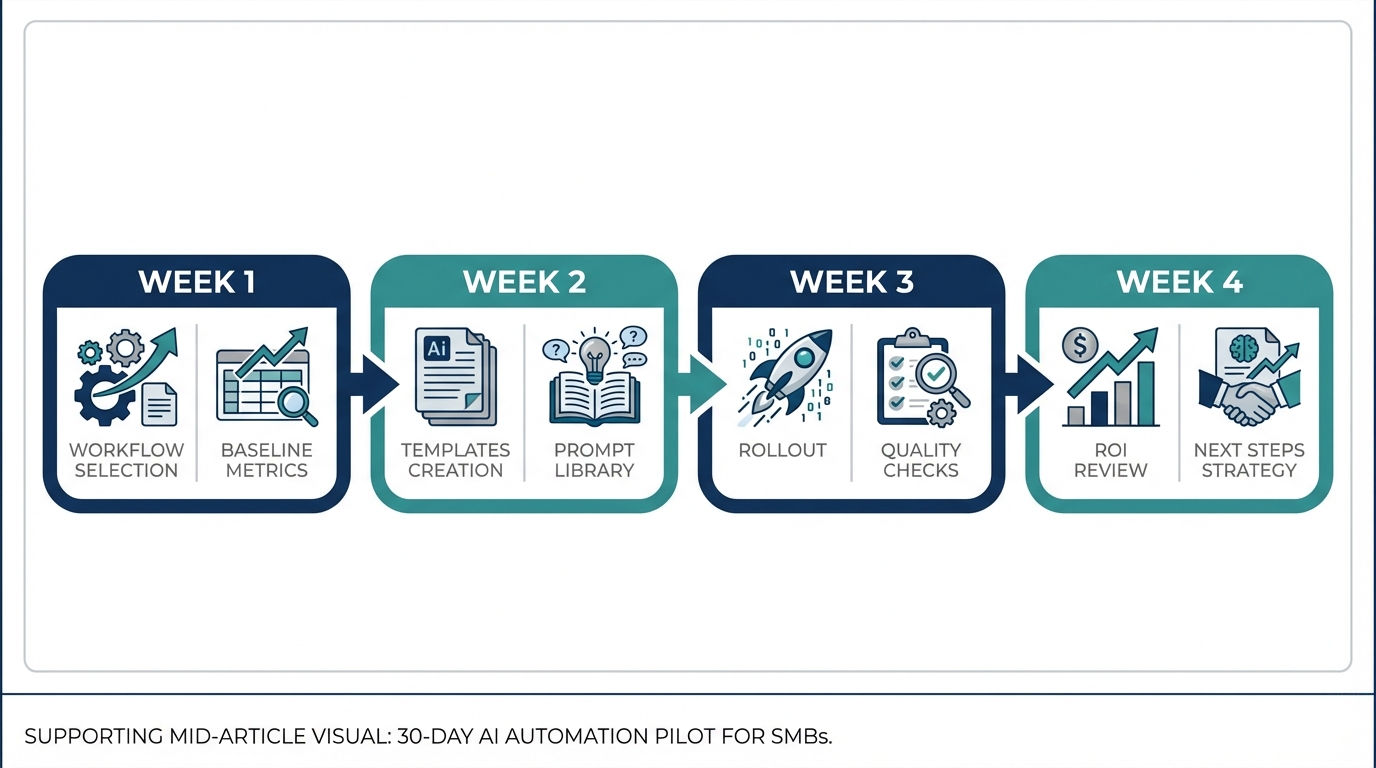
Your 30-day plan (week by week)
Week 1: Pick 2 workflows + capture 5–10 baseline samples
Week 2: Build templates (prompt library, email macros, doc outlines)
Week 3: Roll out to the right roles + run spot checks
Week 4: ROI review + scale/stop decision
Week 1 — pick two workflows and baseline the starting point
For each workflow, grab 5–10 examples and track time-to-complete, rework loops, cycle time (request → sent), and quality issues.
Week 2 — build a template system so results aren’t user-dependent
Build 3–5 templates per workflow (proposal outline, support first-response macro, meeting-to-actions format, invoice follow-up styles). During the pilot, templates are required.
Week 3 — roll out to the right roles (not everyone)
Start with the roles who touch your two workflows daily. Run a short rollout (templates + definition of done, live examples, weekly office hours). Anything customer-facing gets a quick human review until templates stabilize.
Week 4 — ROI review and scale/stop decision
Keep it to one page. At day 30, choose one outcome: scale, refine (2 more weeks), or stop and pick a better workflow.
How to measure ROI (without over-claiming)
A practical ROI approach uses three buckets: time recaptured, quality/risk reduction, and revenue lift (only when you can attribute it credibly).
SMB-safe ROI scorecard (use these metrics)
Time recaptured (hours/week) × loaded cost × recapture rate
Rework loops per item (fewer revisions)
First response time (support)
Escalation rate (fewer expert interrupts)
Proposal turnaround time (faster pipeline movement)
The recapture rate (the number owners miss)
Saved time doesn’t automatically become value. Use a recapture rate: the percent of saved time that turns into real capacity, revenue, or cost reduction. In many SMBs, 25–60% is realistic.
Define “done” so you don’t ship faster-but-wrong
Before you scale, define what “good” looks like—then spot-check a small sample weekly (5–10 items is enough to start).
Proposals include scope, timeline, pricing, assumptions, and exclusions
Support replies cite the correct policy and confirm the next step
Action items have an owner and a date
Guardrails: what not to paste into AI (and a simple acceptable-use policy)
A lightweight acceptable-use policy keeps your team safe without killing momentum.
Do-not-paste checklist
Customer payment details
Passwords, API keys, or credentials
Highly sensitive personal data (SSNs, medical info, etc.)
Regulated or contract-restricted client data
Simple approval rules
External messages get a human review until templates stabilize
Financial or policy statements must reference an approved source (SOP, contract, or KB)
Final offers (pricing, terms, margins) must be validated by the margin owner
Which tool should you start with? (ChatGPT Business vs Microsoft 365 Copilot)
Pick based on where your work already lives—then match the tool to your two workflows.
If you need fast drafting + cross-functional templates
ChatGPT Business is often a strong starting point for writing-heavy roles (proposal drafts, SOP drafts, support macros, meeting-to-actions formatting). Confirm current pricing before purchasing.
If you live in Outlook + Teams + Word/Excel every day
Microsoft 365 Copilot can be high-impact when workflows already live inside Microsoft 365 (thread summaries, drafting, meeting assistance). Confirm packaging and what’s included in your plan.
Role-based licensing: who gets a seat first
Sales lead / account manager
Support lead / frontline responders
Operations/admin coordinator
Owner or GM (only if used consistently)
Quick-start checklist (do this this week)
Pick two workflows that are frequent, painful, and measurable
Collect 5–10 baseline samples per workflow and record time-to-complete + rework loops
Create three templates per workflow (standard, short, edge case) and require them for 7 days
Run a weekly 30-minute ROI check: what improved, what broke, what needs a better template
Decide at day 30: scale, refine, or stop
FAQ
What’s the best AI automation for a small business?
The best AI automation is the workflow you run every week that’s slow, repetitive, and measurable. Start with proposals, support first response, meeting-to-actions, or invoice follow-ups.
How do I measure ROI from AI tools?
Baseline the workflow first, then track cycle time, rework loops, and quality issues weekly. Use a realistic recapture rate (often 25–60%) so ROI reflects real capacity—not theoretical time savings.
Should I start with Copilot or ChatGPT?
Start with where your work lives. If workflows are inside Microsoft 365 all day, Copilot can fit naturally. If you need fast cross-functional drafting and a shared template library, ChatGPT Business is often an easy pilot.
Your next move
If you want momentum without chaos, run the 30-day pilot with two workflows, a simple scorecard, and clear quality rules. Prove ROI in 30–45 days, then scale.

Want help picking the right two workflows and setting baselines that stand up to scrutiny? Book a short ROI scoping call and build templates your whole team can use.
Comments