
AI Automation for Small Business: The 30-Day Playbook for Measurable ROI
- Wix Services

- Mar 18
- 7 min read

AI Automation for Small Business: The 30-Day Playbook for Measurable ROI
You didn't start your business to live in your inbox, chase overdue invoices, or rewrite the same customer replies every day.
But once you grow past a handful of employees, small tasks multiply. Follow-ups slip, tickets pile up, and marketing becomes a constant scramble.
AI automation for small business is one of the simplest ways to get time back - if you treat it like a workflow upgrade, not a shiny new tool.
What "AI automation" means for a small business (no jargon)
AI automation for small business means using AI to reduce time spent on repeatable work by drafting, summarizing, sorting, and suggesting next steps - while your team stays in control of what gets sent, filed, or promised.
Done right, AI automation improves speed and consistency without risking your reputation.
AI drafting vs. AI doing (the difference that protects your brand)
Think of AI in two levels:
AI drafting: creates a first version (email reply, proposal section, SOP, meeting recap).
AI doing: takes action (sends the email, updates the CRM, routes a ticket, creates tasks).
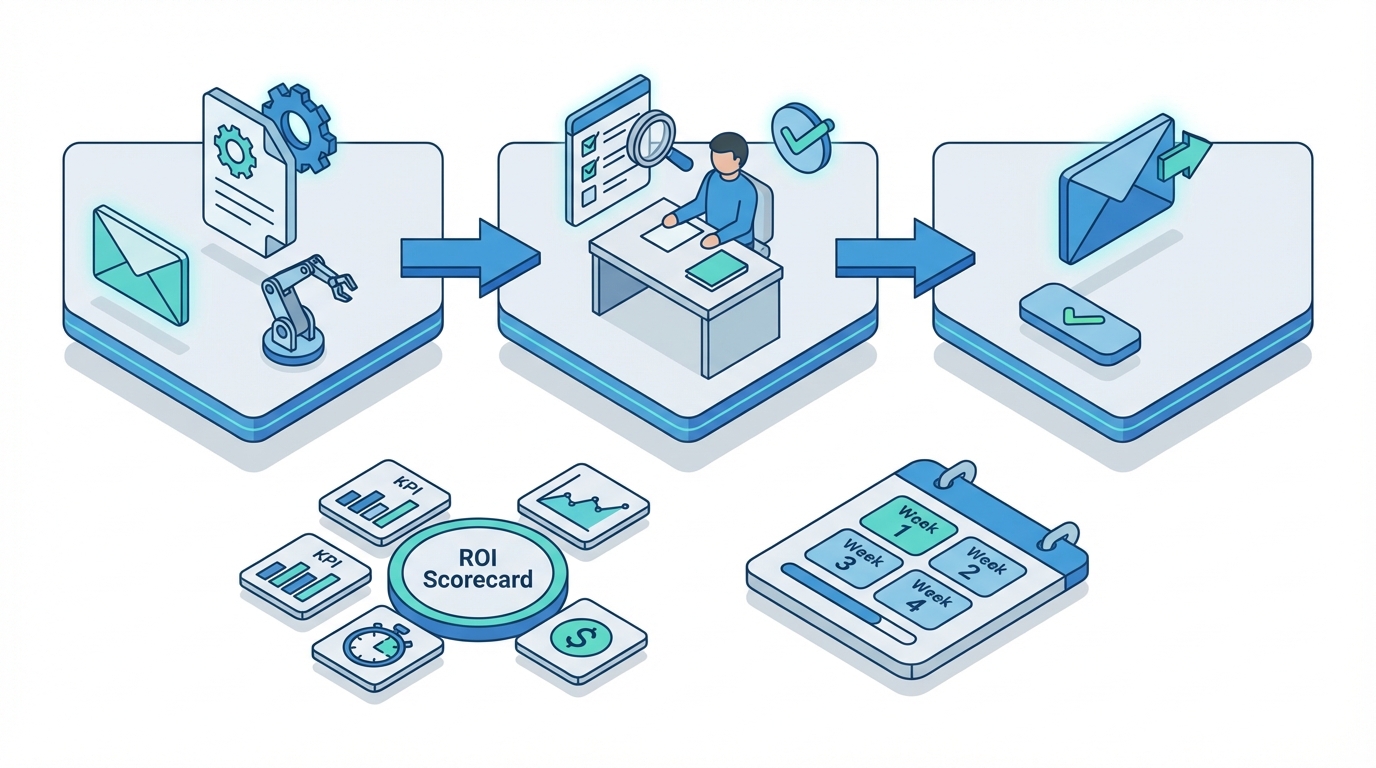
For most teams, the safest starting point is:
Draft
Review
Send
You still gain speed, but you avoid the nightmare scenario: an overconfident message going to the wrong customer.
Why SMBs get burned (and why "more AI" doesn't fix it)
When AI automation disappoints, it's usually because the business skipped the boring parts that make it work:
No baseline metrics, so you can't prove value.
No templates, so outputs vary wildly by person.
No definition of done, so your team gets stuck in AI draft-to-human rewrite loops.
No rules for sensitive data, so risk grows quietly.
Fix those four issues and AI stops being a toy and starts being a system.
The 3 fastest AI automation wins (5-50 employees)
If you want fast results, don't chase 20 automations. Pick two workflows that happen every day and measure them.
Inbox to outcomes (sales + customer service): faster replies, consistent follow-up, fewer dropped balls.
Quote-to-cash speed (sales ops + finance): faster quotes, cleaner invoices, better cash flow.
Marketing production system (with guardrails): more campaigns and content without hiring a full studio.
Win #1: How to automate customer service with AI (without losing the human touch)
If your team answers the same questions every week, AI can cut response time immediately. A practical setup looks like this:
AI drafts a reply using a structured template.
A human checks accuracy and tone (usually 30-60 seconds).
The human sends it.
KPIs to track (choose 2-3):
First response time
Tickets closed per day
Re-open rate
Escalation rate
CSAT (if you collect it)
Tools that usually fit: Zendesk, Freshdesk, Help Scout, Gmail, Outlook.
Win #2: AI email automation for sales follow-ups (where revenue leaks quietly)
Most SMBs don't lose deals because the product is bad. They lose deals because follow-ups are inconsistent, slow, or forgotten.
With AI, you can standardize follow-up without sounding robotic:
Summarize a call into clear next steps.
Draft a follow-up email in your tone.
Generate a simple no-response sequence (3-5 touches).
KPIs to track:
Follow-ups sent within 24 hours
Lead-to-first-response time
Lead-to-quote time
Win rate by lead source
Tools that usually fit: HubSpot, Salesforce, Pipedrive, Zoho CRM.
Win #3: AI tools for small business productivity in marketing (with brand guardrails)
AI can increase marketing throughput, but only if you set boundaries. Start with three assets:
A simple brand voice guide (we do / we don't).
Approved offer language and proof points (so nobody invents claims).
A review checklist before anything goes public.
KPIs to track: content produced per week, time to launch a campaign, cost per lead, landing page conversion rate.
Tools that usually fit: Google Docs, Microsoft Word, Canva, Notion.
The 30-day rollout plan that turns AI into measurable ROI
Most AI rollouts fail because they start with tools. The better approach starts with workflows, owners, and measurement.
Week 1 - Choose 2 workflows + baseline the numbers (2-3 hours total)
Choose two workflows: one customer-facing (sales or support) and one back-office (ops, finance, onboarding). Baseline for five business days: cycle time, quality (rework), and volume.
Week 2 - Build templates + a definition-of-done checklist (3-5 hours)
Create 3-5 templates (support replies, follow-up emails, quote explanations), a checklist that defines good (accuracy, tone, next step, disclaimers), and a simple rule for when AI is allowed - and when it's not.
Week 3 - Pilot with 5-15 users + daily 10-minute tuning
Pick the people who live in these workflows. Do a 10-minute daily check-in: what worked, what broke, and what needs a better template. Save good vs. bad examples and update templates mid-week.
Week 4 - ROI readout + scale/stop decision (60-90 minutes)
By day 30, you should be able to answer: Did cycle time improve? Did quality hold? Did rework go down? Did risk go down? If the numbers moved, expand to the next workflow. If they didn't, fix the workflow before buying more tools.
Tool choices: Microsoft 365 Copilot vs Google Workspace Gemini vs ChatGPT Team
You don't need the best AI. You need the AI your team will actually use, plus guardrails you can maintain.
If you live in Outlook/Teams/Excel: Microsoft 365 Copilot
Copilot is a strong fit for email-heavy businesses and Teams-centric operations: email thread summaries, meeting recaps, action items, and first-draft docs. Pilot with 5-15 seats and expand only if KPIs improve.
If you're Google-first: Gemini in Workspace
Gemini is an easy on-ramp for Gmail/Docs/Drive teams. Standardize templates and review so results are consistent, and treat AI features as not free - unmanaged usage creates hidden cost through rework.
If you need cross-tool flexibility: ChatGPT Team
ChatGPT Team can provide one governed place for drafting, analysis, and internal playbooks across departments - especially for marketing drafts, sales messaging, and SOP creation.
The bundled AI trap: invisible spend + invisible risk
Bundled AI can hide expanding licenses (invisible spend) and unreviewed customer-facing content (invisible risk). The goal is measurable outcomes with controlled risk - not more usage.
Governance and risk guardrails (a simple checklist you can adopt today)
You don't need a legal department to be responsible. You need clear rules people can follow.
Define approved tools (and discourage everything else).
Define approved use cases (draft replies, summarize calls, draft SOPs).
Ban sensitive inputs: customer PII, passwords, banking info, full contracts, private employee data.
Require human-in-the-loop for customer-facing messages until quality is proven.
Create a source of truth for pricing, policies, and terms.
Spot-check outputs weekly for accuracy and tone.
Clean up permissions: what someone can access in Drive/SharePoint is what AI can surface.
These guardrails reduce team anxiety and protect your reputation while you scale.
ROI scorecard: prove value in dollars (without fancy analytics)
Use a lightweight scorecard to answer: Is AI saving time, making money, or reducing risk?
Sales follow-up: follow-ups sent under 24h (baseline 55% - target 85%) - owner: Sales Lead.
Customer support: first response time (baseline 6 hrs - target 2 hrs) - owner: Support Lead.
Quote-to-cash: lead-to-quote time (baseline 3 days - target 1 day) - owner: Ops/Finance.
Marketing: content per week (baseline 3 - target 8) - owner: Marketing.
Onboarding: time-to-ramp (baseline 30 days - target 21 days) - owner: Ops/HR.
What timeline to expect
Quick wins: 3-10 days (drafting, summarizing, templated replies).
Measurable workflow impact: 2-4 weeks (baseline + pilot + tuning).
Cross-team standardization: 6-12 weeks (governance, training, light integrations).
If you're not seeing movement by week 4, the issue is usually workflow design - not the tool.
Real examples you can model
Use these examples as patterns, not rigid recipes.
Services firm (10-20 people): meeting recap to action plan to follow-up
A tight workflow: Copilot or Gemini summarizes the meeting and drafts action items, AI drafts a client recap email using your template, and the account owner reviews and sends. Targets: fewer missed tasks and faster follow-ups.
Distributor (25-50 people): faster customer replies + quote drafts
AI drafts responses using product/availability templates and drafts quote language, while pricing is pulled from a controlled source. A human approves anything that includes price, lead time, or commitments.
Home services (10-30 people): estimate explanations + review replies
Standardize estimate explanations, appointment confirmations, and review responses so your team spends less time repeating the same language and more time delivering.
FAQ
How do I start AI automation with a small team?
Start with one customer-facing workflow and one back-office workflow. Baseline for five business days, then introduce templates and a review checklist before expanding.
What's the cheapest way to get ROI from AI?
Standardize your templates and checklists first, then pilot AI with a small group. Most wasted spend comes from buying too many seats before you've proven a measurable workflow gain.
Can AI send emails automatically to customers?
It can, but most businesses shouldn't start there. Begin with draft-review-send. After 30-60 days of proven quality, you can automate low-risk messages with a human approval step for exceptions.
Is Microsoft 365 Copilot worth it for a small business?
It's worth it when it reduces cycle time in workflows your team already does daily (email, meeting follow-ups, document drafting). Pilot with a small group and expand only if the numbers improve.
How do I prevent employees from pasting sensitive data into AI tools?
Publish a one-page rule for what can/can't be pasted, provide approved tools and templates, spot-check outputs weekly, and clean up Drive/SharePoint permissions.
Next steps: your 7-day quick start
Pick two workflows and baseline them for five business days. Then build templates and a definition-of-done checklist before expanding tool usage.
Day 1 (30 minutes): pick 1 sales or support workflow and 1 back-office workflow.
Days 2-5 (10 minutes/day): track cycle time, rework, and volume.
Day 6 (60-90 minutes): create 3 templates and a review checklist.
Day 7 (30 minutes): start a pilot with 5-15 users and set a date for your 30-day ROI readout.
If you want a faster path, get a short workflow triage and leave with your top two use cases, the scorecard to track, and the guardrails that prevent costly mistakes.
Related Whitecity resources
AI policy template for employees
ROI scorecard you can copy
Copilot vs. Gemini for SMB workflows
ChatGPT Team for business operations
Case studies
Comments