

AI Customer Service Automation for Small Business: A 30-Day Plan to Cut Tickets and Respond Faster
- Sam Weinstein
- Apr 6
- 6 min read

Your customers expect fast, accurate answers. Meanwhile, your support workload grows faster than your headcount.
If you run a 5–50 person company, you’ve probably seen the same questions hit your inbox every day—order status, rescheduling, returns, basic troubleshooting. Those interruptions slow your team down and pull you away from higher-value work.
The upside: AI customer service automation for small business is now practical, affordable, and quick to roll out—if you start with the right workflows and measure results.

What AI customer service automation means (in plain English)
AI customer service automation for small business is the use of AI to answer common customer questions, triage and route support requests, and draft replies for your team—so you can respond faster without hiring.
The safest approach uses approved answers, clear escalation rules, and a human-in-the-loop review step for anything high-risk.
What you can automate today (safely)
Most SMBs see the quickest wins from three areas:
FAQ deflection (self-serve answers): AI answers routine questions instantly on your website or help center.
Ticket triage: AI auto-tags, prioritizes, and routes incoming requests so the right person answers.
Agent assist: AI drafts replies and summarizes long threads so your team can approve and send faster.
What you should keep human-first (at least at the start)
Even with AI customer service automation for small business, some situations should stay human-led until your process is proven:
Refund approvals, credits, warranty exceptions, or charge disputes
Custom pricing, contract terms, legal promises, or policy exceptions
Anything involving sensitive personal data or account changes
Think of AI as your first-line assistant, not your final decision-maker.
The cost of doing nothing (it’s not just annoying)
Support “lag” quietly taxes your business. When response times slip, customers follow up more, ticket volume rises, and your team spends the day reacting.
Over time, that creates expensive second-order effects:
First response time creeps up, and customers send duplicate messages (“Hello??”), which multiplies workload.
Sales leads wait too long, and high-intent prospects buy from a faster competitor.
Retention suffers because customers don’t feel taken care of.
Hiring becomes the default fix, even when a large share of tickets are repetitive and low-risk.
If you’re paying for ads, SEO, or partnerships to generate leads, slow support becomes one of the most costly leaks in your funnel.
The fastest wins for small teams (start here)
The best way to succeed with AI customer service automation for small business is to start small, pick one channel, and focus on predictable questions.
In most businesses, you’ll get the fastest ROI from website chat or your helpdesk/shared inbox—because those channels capture high volume and repeat issues.
Win #1 — Deflect the top 10–25 repetitive questions (30–90 minutes to set up)
Most owners can identify the top questions in 15 minutes by scanning recent tickets or asking their team.
Start with frequent, low-risk requests like:
Order status / delivery timing
Store hours / service area
Appointment scheduling and rescheduling
Returns policy and basic troubleshooting
“What’s included?” questions for your core packages
Once you publish approved answers for these, AI customer service automation for small business can resolve many requests instantly and reduce interruptions during your day.
Win #2 — Auto-tag and route tickets (2–4 hours to configure)
Routing is where you get hidden time back. Instead of “who should answer this?” ping-pong, tickets land in the right queue from the start.
A simple triage setup typically includes:
Tags like billing, shipping, technical, urgent, sales lead, cancelation
Priority rules (for example: “VIP customers first” or “anything with ‘refund’ gets escalated”)
A clear owner for each category
This is a core part of customer support ticket triage automation, and it’s one of the most practical forms of automated customer support for a growing team.
Win #3 — Draft replies in your brand voice (1–2 days to standardize)
Even when you don’t deflect a ticket, AI customer service automation for small business can cut response time by drafting a strong first version.
Draft polite replies based on your policies
Summarize long customer threads into a few bullet points
Suggest next steps and questions to ask
Typical pricing for ChatGPT Business is $25/user/month billed monthly or $20/user/month billed annually (minimum 2 seats).
A simple human-in-the-loop workflow (so you keep control)
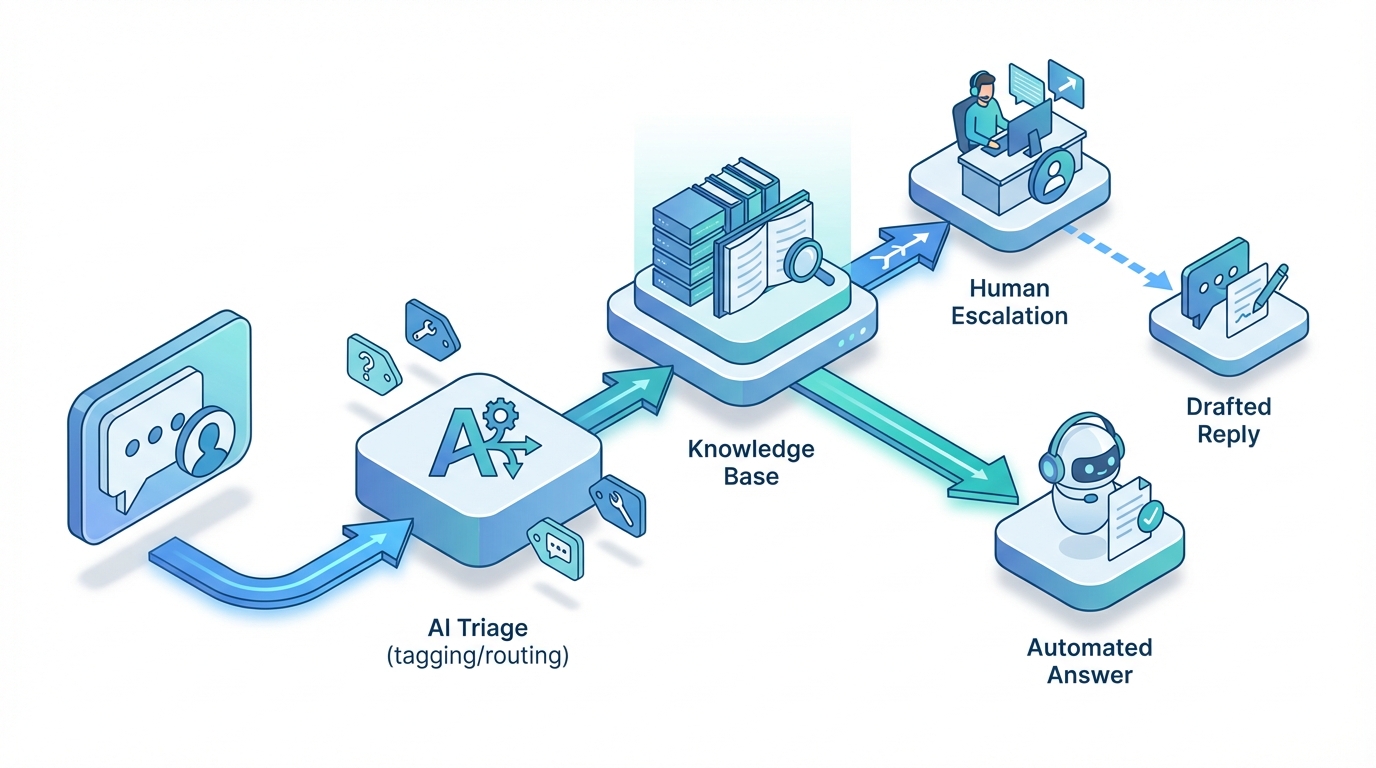
A reliable setup for AI customer service automation for small business follows a predictable path:
A customer asks a question via website chat or email.
AI searches your approved answers (your knowledge base or FAQ).
If the question is routine, AI responds immediately.
If the request is unclear, emotional, or high-stakes, the system escalates to a person—with a drafted response.
This protects the customer experience while still delivering the speed benefits of AI customer support.
The AI ROI Scorecard (how you prove it worked)
A simple scorecard turns AI customer service automation for small business into a measurable business project. It also helps you decide when to scale, pause, or fix.
Track these 6 metrics weekly (30 minutes per week)
First response time (FRT)
Deflection / containment rate
Escalation rate
Hours per ticket (or cost per ticket)
CSAT (or complaint rate)
Reopen / repeat contact rate
A practical scale / fix / pause rule
Scale if containment goes up and complaints/reopens stay flat (or improve).
Fix if containment goes up but reopens or escalations spike (the answers need work).
Pause if tracking is messy and you can’t tell what changed (better measurement beats adding more tools).
A 30-day rollout plan you can actually execute
With the right scope, AI customer service automation for small business can deliver a measurable win in 30 days.
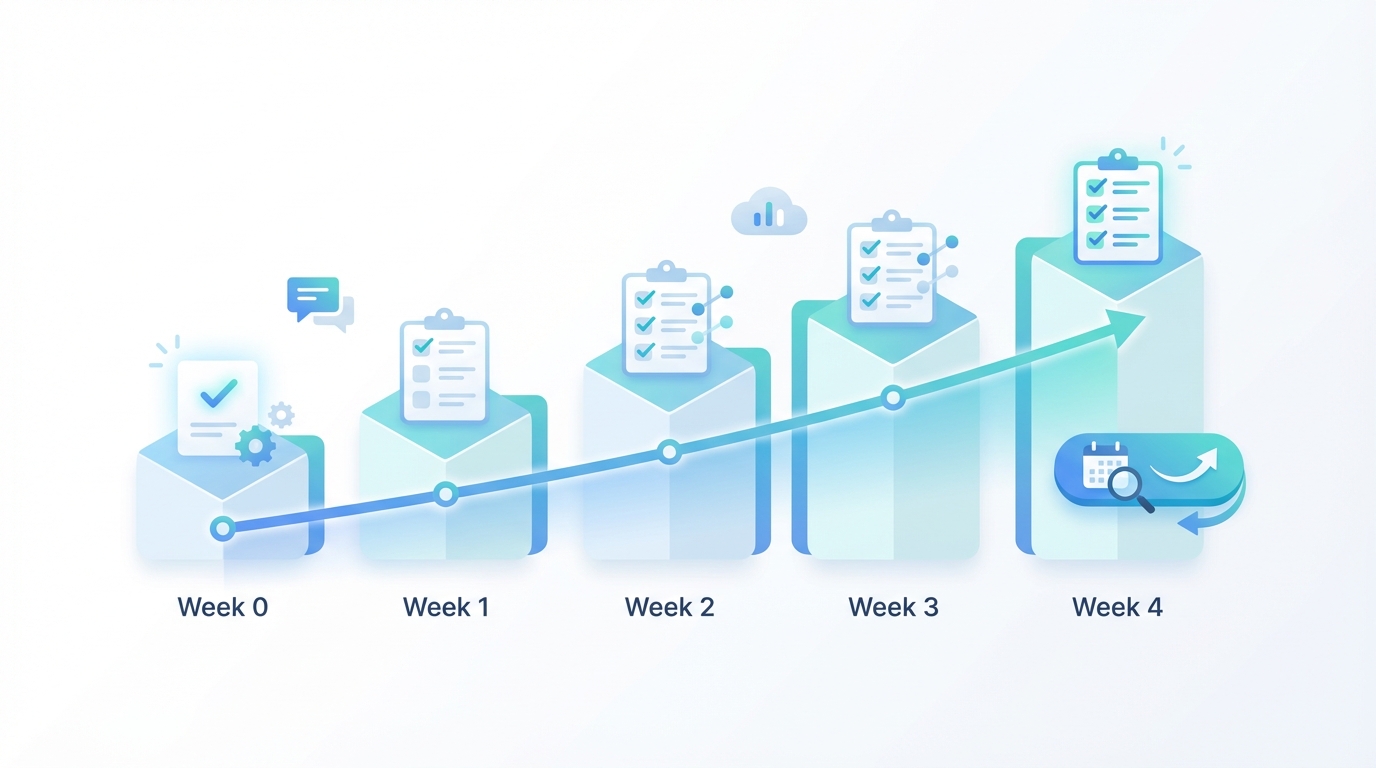
The 6-step 30-day plan (overview)
Pick one channel and one measurable outcome.
Baseline your metrics (FRT, volume, reopens, complaints).
Create approved answers for the top 10–25 questions.
Launch low-risk automation with strict escalation rules.
Add triage + reply drafting to speed up human handling.
Review the scorecard and scale only if quality holds.
Week 0 — Pick one workflow and lock a baseline (1–2 hours)
Choose one channel and one problem you want to improve (website chat, shared inbox/email, or your helpdesk). Pull the last 30–60 days of ticket data if you have it.
Week 1 — Clean up your approved answers (half-day to one day)
Create a simple approved-answers library (FAQ or internal doc) with customer wording, policy-aligned responses, and clear escalation rules.
Week 2 — Launch low-risk automation + escalation rules (2–6 hours)
Start with low-risk intents (hours, policies, status updates) and route anything high-stakes to a human (refunds, chargebacks, account changes, exceptions).
Week 3 — Add triage and agent assist (half-day)
Layer in ticket triage automation and reply drafting so your team handles the remaining tickets faster.
Week 4 — Review results and decide scale or stop (60–90 minutes)
Compare baseline vs current metrics. If speed and quality improve, expand to the next workflow. If results look noisy, tighten measurement and approved answers before scaling.
Tool and budget reality (what SMBs can start with)
You don’t need an enterprise contact-center suite to see value. A simple starter stack can be: a website chat widget, your existing helpdesk/shared inbox, an AI assistant for drafting/summaries, and a simple KPI dashboard.
Before you launch: a quick checklist (10 minutes)
Define what AI can answer (top FAQs only) and what always escalates.
Create an approved answers source so responses stay consistent.
Assign ownership for updates and scorecard review.
Confirm permissions so AI can’t access or expose sensitive internal info.
Plan a rollback so you can revert within 24 hours if quality drops.
Next steps (what to do this week)
Today (30 minutes): list your top 10 repetitive questions.
This week (2–4 hours): write approved answers and escalation rules.
Next week (half-day): launch website chat deflection or inbox triage.
Weekly (30 minutes): review your AI ROI scorecard.
If you want expert help, WhiteCity can accelerate setup and measurement so you get a clean result in 30 days:
AI Automation Services: https://whitecity.ai/ai-automation-services
AI ROI scorecard and dashboard setup: https://whitecity.ai/ai-roi-scorecard
FAQ
How much can AI reduce support tickets?
Many teams see meaningful reductions when they start with the top repetitive questions. Your best predictor is the share of tickets that are policy/status-related versus complex account-specific issues.
Will customers hate chatbots?
Customers hate dead ends. If your bot answers routine questions quickly and makes it obvious how to reach a person, most customers prefer the speed.
How do I keep AI from making things up?
Use an approved-answers-only approach. Connect the bot to your knowledge base, tell it not to guess, and escalate when confidence is low.
Do I need a new helpdesk to do this?
Not usually. Most SMBs can start with their current inbox or helpdesk, add AI around it, and upgrade tools only after the scorecard proves where the bottleneck is.
Final takeaway
AI customer service automation for small business works when you treat it like an ROI-measured workflow improvement—not a “set it and forget it” chatbot.
Start with the top repetitive questions, keep a human-in-the-loop for anything sensitive, and use a weekly scorecard to protect quality.
If you want a fast, low-risk start, book a 30-minute AI Support ROI Review to identify your highest-leverage workflow, set success metrics, and map a 30-day pilot that fits your team.
Comments